
Video game console rental prices and weekly payment terms
October 29, 2026
Published by Life4Rent · Operated by Brohf Software OÜ
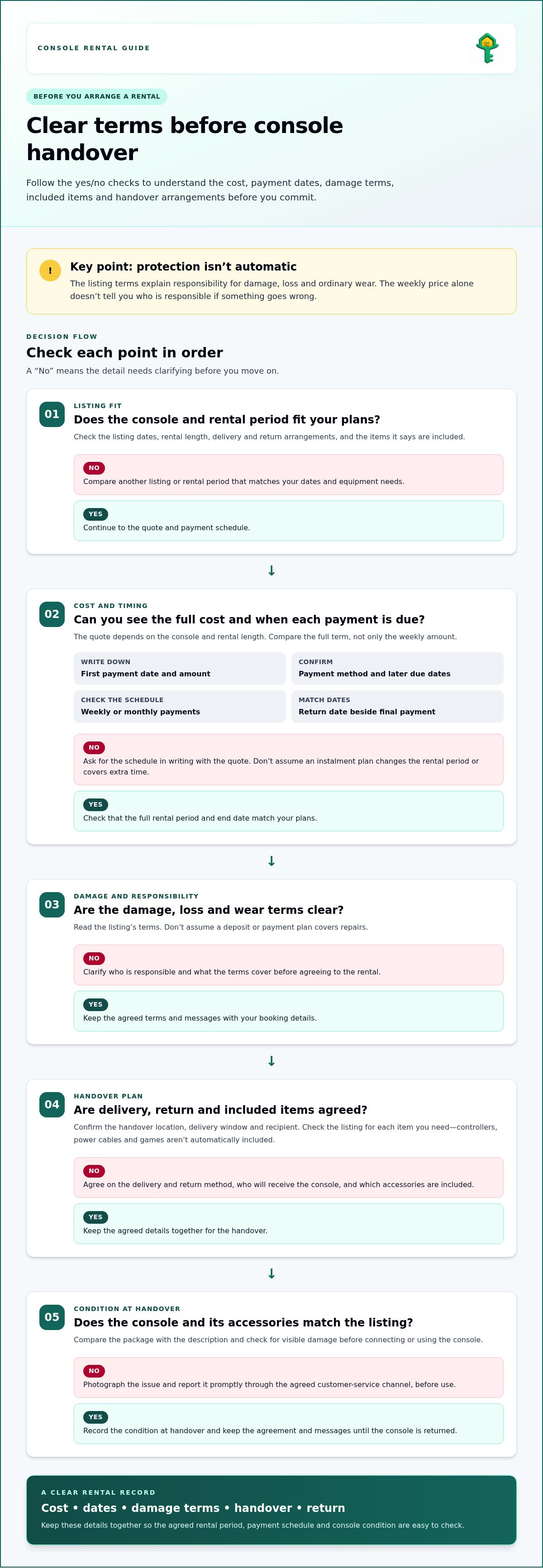
Damage protection isn’t automatic. With a video game console rental, coverage depends on the listing terms, so the weekly price alone won’t tell you who is responsible if something goes wrong. Rental prices and payment schedules can also vary by listing.
It’s sensible to settle those details before arranging a handover. A console is valuable equipment, and unclear terms can turn a fun rental into an awkward surprise.
This guide explains how weekly payments work, what to check in damage terms, and how delivery, customer service, and availability fit into the process. You’ll also learn the usual steps, from choosing a listing to arranging the rental, so you can decide whether renting suits your plans. Focus on the essentials: what you’ll pay, when payments are due, and what happens if the console is damaged.
Weekly rental payment amounts and payment terms
A weekly rental price depends on the console, rental period, and arrangement. The price is provided after a quote request, with the console and rental length shaping the amount. Compare the total cost for the full term, not just one week, before choosing a video game console rental. A lower weekly price can still add up over a longer rental.
Payment methods vary by provider. Online checkout or an app may show the amount and due date together. A phone booking may involve discussing payment steps with a representative, while an in-store rental may be paid at the counter. These are possible options, not a guarantee that every provider accepts each method. Before committing, note the payment method, first due date, and any later scheduled payments.
Weekly and monthly payments describe different schedules, not necessarily different rental products. A monthly arrangement may suit a longer gaming period, while a weekly plan may fit a shorter stay. A lease may set a fixed term with recurring payments, so check whether the agreement is for temporary use or a longer commitment. Compare the full rental period and end date.
Write down the schedule before you pay:
- Record the first payment date and amount shown in the quote.
- Note each following due date and whether payments recur weekly or monthly.
- Keep the agreed return date beside the final scheduled payment.
Payment plans can spread the cost across agreed instalments, but the schedule and total depend on the arrangement. Don’t assume a plan changes the rental period or covers extra time. Ask for the payment schedule in writing with the quote, then compare it with your gaming dates.
Which local stores offer video game console rentals near me? There’s no single nationwide list, since nearby options depend on your location and each store’s rental service. Search by town or ZIP code, then compare the weekly or monthly schedule, payment method, and return terms before arranging a rental.
Delivery and customer service
Delivery arrangements affect when you can start playing and how the console reaches you. Before confirming a booking, agree on the handover location, delivery window, and who will receive the package. If you’ll be away during the day, for example, arrange a suitable alternative rather than assuming the parcel can be left unattended.
Check what’s included with the console. Compare the listing or rental agreement with the package, including the controller, power cable, and any other promised accessories. Photograph the console and accessories at handover, then report visible damage through the agreed customer-service channel before connecting the console.
Keep these details together for an easier handover:
- The agreed delivery date, location, and recipient.
- A list of included items, such as a PlayStation controller and power cable.
- The return method and the person who will receive the console.
Good customer service starts with a clear way to ask questions. Save the contact method provided for the rental and keep your booking details nearby. If the console won’t turn on, describe the issue, the steps you’ve tried, and any visible error message. Clear details help the other party understand the problem.
Before troubleshooting, check the power connection and make sure the console is connected as intended. Don’t open the device or attempt a repair without agreement, as this could complicate responsibility for damage. If a PlayStation controller is missing or the console arrives with a cracked casing, document the issue and report it promptly through the agreed channel.
An upgrade may mean choosing a different console for another rental, rather than changing your current booking. If your plans shift from casual gaming to a group session, compare available listings and agree on any change before handover. Keep the delivery, accessories, support contact, and return arrangements together in a message or record, so each step is easy to follow.
How console game rentals work
A rental gives you access to a console for an agreed period, under terms set before handover. Match the equipment, dates, and return conditions to your plans.
The Console Game Rental Process
Start by choosing a console and rental period, then read the listing for dates, included items, delivery, and return arrangements. Before agreeing, clarify the payment schedule and what happens if your plans change. At handover, compare the console with the description and record any visible damage. Keep the agreement and messages until the console is returned.
Damage protection isn’t automatic. Read the rental terms to understand responsibility for damage, loss, and ordinary wear. Don’t assume a deposit or payment plan covers repairs. If a Nintendo console arrives with a cracked case, photograph it and report the issue through the agreed channel before use. This creates a clear record of the console’s condition at the start.
Games, Controllers, and Accessories
Games, controllers, and accessories aren’t automatically included with every console rental. Check the listing description for each item you need, such as a controller, power cable, or specific game. If the listing includes only the console, plan to provide the other items yourself. Confirm what’s included before accepting the rental, then check the items at handover.
Are video game console rentals available for events, parties, or short-term use? Yes, a rental can suit a party or short event if the agreed dates cover setup, play, and return. Choose a period that includes the full event schedule, not just the hours guests will play.
For a group session, make a simple equipment checklist before booking: console, controllers, required cables, and games. Check that each item appears in the rental details, then test the setup after handover. This can help you spot missing items before guests arrive and leave time to follow up through the agreed contact channel.
Where can I rent a video game console in the United States?
In the United States, start with rental listings and local businesses near your town or ZIP code. Search terms such as “console rental” or “gaming equipment rental” may bring up different options. A nearby game or electronics shop may rent consoles, while an event rental business may provide equipment for parties. Treat each result as a lead, then review its actual rental terms.
For a local search, narrow the results by console and rental dates. A PlayStation listing may suit one game library, while a Nintendo console may fit another. Compare pickup or delivery arrangements, rental period, payment schedule, and return method. If a listing doesn’t clearly describe an item, don’t assume it comes with the console.
Before booking, use these steps to compare options:
- Enter your location and the dates you need the console.
- Compare the console model and listed accessories, including controllers and cables.
- Read the damage, cancellation, and return terms before agreeing.
- Save the booking details and the renter’s customer-service contact method.
Local pickup can make handover straightforward, but you’ll need to arrange a suitable time and place. Delivery can save a trip, but confirm the arrival window and who can receive the equipment. For an event, include setup time in your rental dates and make sure the return arrangement works after the gathering.
A video game console rental through a peer-to-peer marketplace can offer another way to find equipment listed by individuals. Compare each listing’s details and agreed terms, rather than assuming every listing includes the same support or accessories. If you’re looking for electronics alongside other everyday items, browse rental listings by category to see what’s available for your plans.
Life4Rent: A Rental Marketplace for Everyday Items
Life4Rent is a peer-to-peer marketplace where people list and rent everyday items across 17 categories, including electronics, tools, outdoor and sports gear, homes, and baby products. If you’re looking for gaming equipment, explore the electronics listings and read each item’s description to see what it offers.
A peer-to-peer marketplace can be a useful place to compare listed items and rental arrangements. Review each listing’s terms to understand how the rental works. Owners can also list their belongings, making the marketplace relevant to people looking to rent out everyday equipment.
Visit Life4Rent to explore the marketplace.
Choose the Rental That Fits Your Plans
Before arranging a video game console rental, consider how you’ll use it. A casual evening, a group session, and a longer gaming stretch may call for different choices. Let your plans guide which rental terms to examine closely.
Consider the practical details of your schedule, setup, and return. Planning ahead can help you decide whether renting suits this occasion, without committing to equipment you won’t use regularly.
If you’d like to explore your options, visit Life4Rent and take the next step at your own pace.
Frequently Asked Questions
Are gaming consoles and PCs protected against damage?
Damage protection depends on the rental terms and any optional protection attached to the arrangement. Life4Rent Protect is optional, isn’t insurance, and reimbursement is discretionary. An owner may also request an optional security deposit for a high-value item; it’s released after a successful return. Before using a console or PC, record its condition and keep a copy of the agreed damage terms.
Can I rent a PS5 or Xbox with no credit?
A credit card isn’t required to list an item on Life4Rent, but that fact doesn’t determine renter approval or payment requirements. For a PS5 or Xbox rental, payment options depend on the listing’s terms. Read those terms before arranging the rental, and distinguish a credit check from a request to pay by credit card. The two aren’t the same requirement.
How long is shipping?
Life4Rent’s Delivery Service is coming soon, so it isn’t currently available through the platform. For another handover arrangement, the timing depends on the location and the agreed method. If you’re planning around a specific event, allow time for setup and test the console after receiving it. Agree on the handover timing directly as part of the rental arrangement.
What happens if I need to pause or return my lease?
A pause or early return isn’t automatic; it depends on the rental agreement. Tell the owner as soon as your plans change, then agree on revised dates and any payment adjustments before returning the equipment. Keep the updated arrangement in writing. If the agreement sets a fixed end date, follow its return process unless both parties agree to a change.
Which video game consoles are available to rent, such as PS5, Xbox, and Nintendo Switch?
PS5, Xbox, and Nintendo Switch are examples of consoles people may look for, but a specific model is available only when it appears in an active listing. Read the listing for the exact model and condition, then match it to your games and setup. Don’t assume similarly named consoles or accessories are interchangeable; confirm the listed equipment before arranging a handover.
How much does it cost to rent a video game console per day, week, or month?
There’s no single daily, weekly, or monthly rate for every console rental. The price depends on the console, rental length, included items, location, and handover arrangement. It’s provided after a quote request. Compare the cost and payment schedule for the full rental period, since a short daily rate alone may not reflect the total.
Life4Rent
Rent it. Earn from it. Own less, access more.
Browse peer-to-peer rentals near you, or list what you own and start earning — all protected by Life4Rent Protect.
About the author
Tallinn, Estonia
Philip leads editorial at the Life4Rent Renting Academy, overseeing guides on peer-to-peer rental, platform safety, and consumer finance across 25 markets. He has spent over a decade covering the sharing economy and digital marketplaces, helping renters and owners navigate the shift from ownership to access.