Audio Equipment Rental: A Practical Guide to P2P Sound Solutions in 2026
April 12, 2026
Published by Life4Rent · Operated by Brohf Software OÜ
Last August, an event planner named Marcus found himself staring at a pair of professional speakers that wouldn't connect to his mixer just an hour before a wedding began. Most people worry that an audio equipment rental will fail or that they'll end up with a box of tangled cables they don't understand. It's common to feel overwhelmed by technical specs or the fear that you've paid for a concert rig when you only needed a clear microphone for a small room.
You want your guests to hear every word without the hiss of a bad connection or the high cost of traditional retail rentals. Local owners who know their equipment help you manage gear without the stress. You'll learn how to verify that a speaker works before you drive away and how to spot the specific adapters you'll need for your hardware.
The 2026 standards for P2P transactions now include built-in insurance and verified hardware checks during the equipment hand-off. These tools help you avoid the technical glitches that ruin events while keeping your budget under control.
Understanding Audio Equipment Rental Options for Your Event
Audio equipment rental doesn't have to involve complex contracts with large corporations or specialized AV houses. You can find professional-grade speakers and mixers through local peer-to-peer marketplaces instead. This setup allows you to borrow gear directly from owners in your own neighborhood for a specific timeframe. It's a practical way to access high-quality sound without the long-term commitment of a purchase.
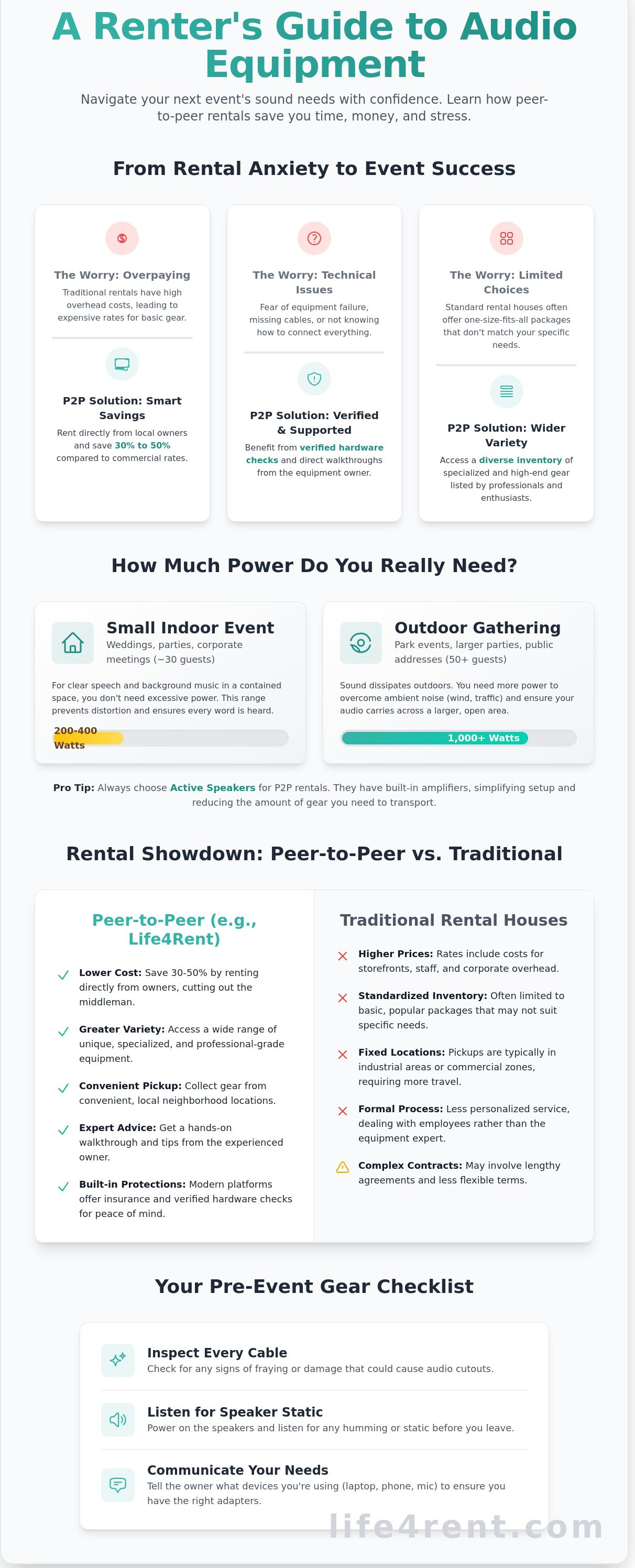
You'll often notice that prices on these platforms are 30% to 50% lower than those at traditional commercial rental firms. This price difference makes it an attractive choice for individuals who need quality sound for a wedding, a birthday party, or a small corporate gathering. You get the same hardware used by professionals but at a fraction of the standard market rate.
To get a better sense of how these rental packages look and what to expect, watch this brief overview:
Most organizers start by looking for a basic Public Address (PA) system to handle voice and music. These systems provide the necessary amplification to reach everyone in the room without distorting the sound quality. You don't need a degree in sound engineering to set up a standard P2P kit. Many owners will even walk you through the basic connections during the equipment hand-over process.
Common Items Found in Rental Listings
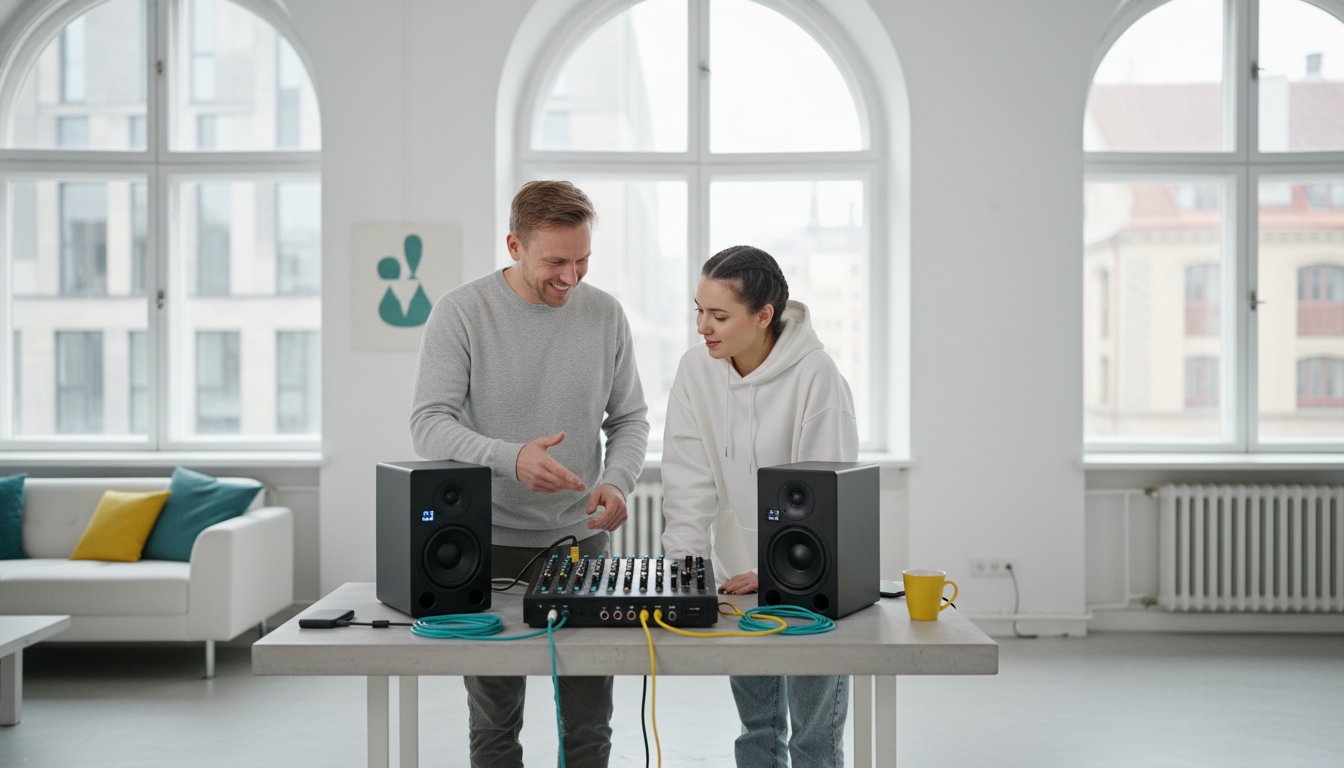
Active speakers are the most common item you'll see because they include built-in amplifiers. This design reduces the number of cables you need to manage and simplifies the power requirements for your venue. Mixers are also essential if you plan to use multiple sound sources like a laptop and a microphone simultaneously. They allow you to adjust the volume of each input separately to avoid sudden noise spikes. You can select wired microphones for stationary speeches or wireless options for better mobility on stage.
Why P2P Rental Makes Sense in 2026
Owners frequently list high-end equipment that sits idle between their own professional projects. You get to use well-maintained gear while the owner earns a bit of extra income from their investment. Pickup points are usually located in residential areas, so you won't have to navigate busy industrial zones or warehouses. This proximity saves you significant travel time on the day of your event. These marketplaces also simplify the search for specialty items like a piano rental near me through the same user interface.
Choosing the Right Components for Clear Sound
Your choice of components determines whether your audience hears a crisp message or a muffled mess. Power requirements vary significantly based on the environment and the number of guests. A small indoor room for 30 people usually stays audible with 200 to 400 watts of power. This range provides enough headroom for speech without distorting the signal when someone speaks loudly. Outdoor gatherings are a different challenge altogether. You'll likely need 1,000 watts or more to overcome wind, traffic, and the lack of reflective walls. Ambient noise levels in urban areas often reach 60 to 70 decibels, so your system must work harder to stay audible for a crowd of 50 or more.
Modern mixers have become much more user-friendly for non-professionals. Many units available for audio equipment rental now feature Bluetooth or USB-C inputs. These connections allow you to play background music or presentations directly from a smartphone or laptop. You won't need to carry a bag of dongles or converters if you check the mixer specs beforehand. A basic grasp of the essentials of live sound engineering helps you map out your signal chain before the gear arrives at your venue.
Active vs. Passive Speakers: Which is Better?
Active speakers are almost always the right choice for P2P renters. These units contain their own internal amplifiers, which means you have fewer heavy boxes to carry. You simply connect your mixer and a power cord to get started. Passive speakers require external power amps and specialized cables, which adds weight and complexity. This setup is bulky and introduces more points of failure for a beginner. If you're managing the transport yourself, a pair of 12-inch active speakers fits in most car trunks and provides plenty of volume for a medium-sized hall.
Microphone Basics for Beginners
Dynamic microphones are the safest bet for live events. They're built to survive being dropped and don't pick up too much background hiss. Condenser microphones capture more detail, but they're fragile and sensitive. They also require 48V phantom power, which not every basic mixer provides. Wireless systems offer freedom of movement, but they come with risks. You must maintain a clear line of sight between the microphone and the receiver. If a crowd of people stands between the two, the signal will likely drop or crackle. You can find reliable kits by checking the available gear on life4rent.com to match your specific event needs.
Evaluating Peer-to-Peer vs. Professional Rental Houses
Professional rental houses operate with a standard business model. They maintain a vast inventory of specific brands and models, which ensures consistency for large-scale events. This reliability comes with a higher price tag. These companies must pay for warehouse space, insurance, and full-time technicians. When you choose a traditional audio equipment rental house, you're paying for that corporate infrastructure.
Platforms like Life4Rent provide an alternative by connecting you directly with equipment owners. You'll find a wider range of gear, from vintage microphones to modern PA systems. These owners don't have the same overhead as a commercial business.
This allows them to offer competitive rates that often fit smaller budgets. You'll also find that individual owners are more willing to negotiate on pickup and return times. A shop might charge a full day's rate for a late return, whereas a neighbor might be fine with a Sunday evening drop-off.
Professional houses do have one clear benefit for complex setups. They often provide on-site technicians for an additional fee. If you're managing a large conference, this service is valuable. If you're comfortable plugging in a few cables yourself, the P2P route is usually more efficient.
The Cost Advantage of Community Sharing
Owners on peer-to-peer platforms price their gear based on local demand and personal use. They aren't trying to hit corporate profit targets every quarter. You can often find a sound system rental for roughly 50% of the retail rate found at major agencies.
Most listings include multi-day discounts. For example, a three-day rental might only cost the price of two days. This makes high-quality audio equipment rental accessible for independent creators and small businesses.
Availability and Proximity Benefits
Travel time is a hidden cost in any rental agreement. You can search for equipment within a 5-mile radius of your venue or home. This saves you from driving across town to a central warehouse.
Local owners frequently include essential accessories like stands and cables for free. They want to ensure you have a good experience with their gear.
This model also supports sustainability. It reduces the need for new manufacturing by maximizing the use of items already in the community.
Testing and Verifying Rental Gear Before Your Event
You should never leave the owner's location until you've verified every piece of kit in your booking. P2P platforms allow you to access high-quality gear, but since these items aren't coming from a central warehouse, you're responsible for the final quality check. Industry data suggests that 20% of technical issues at small events are caused by faulty cables or loose connectors that could have been identified during pickup.
Inspect every cable for visible fraying or exposed wires. You'll want to pay close attention to the points where the wire meets the connector, as this is where most internal breaks occur. A loose shell on an XLR connector can cause an intermittent signal that ruins a recording or a live performance. If a cable looks worn, it's better to ask the owner for a replacement immediately.
Power on every speaker to check for unwanted noise. You should listen for a constant 60Hz hum, which often indicates a grounding issue or a failing internal capacitor. If you hear static when no audio is playing, the speaker's built-in amplifier might be near the end of its life. It's much easier to swap a speaker now than to deal with a distracted audience later.
Speak into the microphones to test the capsules. You don't want to tap the head of the mic; this physical shock can damage the diaphragm or misalign internal components. Use a standard "check, one, two" to listen for clarity. If the sound is muffled or thin, the capsule might be dirty or damaged from previous moisture exposure.
Check that all knobs and faders on the mixer move without resistance. If a fader feels gritty or makes a "crackling" sound through the speakers when moved, the potentiometer is likely dusty. You need smooth transitions for a professional sound, so don't accept a mixer that has "dead spots" in its volume range.
A 5-Minute Sound Check Routine
Play a track you know by heart to test the frequency response. You'll recognize instantly if the high-end is missing or if the bass sounds distorted. This familiar reference point is more reliable than testing with a random radio station.
Listen for "crackling" while you adjust the master volume. This confirms the internal components are clean. You should also test the wireless range by walking the microphone to the furthest corner of your intended venue space. Manufacturers often claim 100-meter ranges, but urban interference can drop that to 30 meters in real-world conditions.
Handling Cables and Accessories
XLR cables are the standard for any professional audio equipment rental because they're balanced and reduce noise over long distances. You should confirm the owner is providing the correct lengths for your specific layout. Request at least two spare cables for every five you plan to use. It's a small addition that prevents a single point of failure from stopping your event.
Make sure that power strips and extension cords are included in the bundle. Statistics from event planners show that 15% of renters forget to account for basic power distribution. You don't want to arrive at your venue and find you have only one wall outlet for a full DJ setup.
Organizing Your Rental Through the Life4Rent Marketplace
You'll find it helpful to read the peer to peer equipment rental guide before you book your first item. It covers the platform basics you'll need to know to navigate the marketplace effectively. Experienced users find that a quick look at these rules prevents common mistakes during the checkout process.
Owners usually know their gear well, so tell them exactly what you need for your audio equipment rental. Be specific about the inputs and outputs you require for your setup. A quick message about your technical specs helps avoid a situation where you pick up a speaker but don't have the right cables to connect it to your mixer.
Take several clear photos of the items when you pick them up. This creates a record of the condition before you start using it. It's a simple step that protects both you and the owner if there's a dispute about a scratch or a dent later. You should check the following during the handoff:
- Check all power cables for fraying or loose connections.
- Test every channel on a mixer to ensure they are clean.
- Look for physical dents on speaker cones or cabinets.
You'll want to return everything by the agreed time to maintain your reputation. Owners often have back-to-back bookings, especially during the summer festival season or around the holidays. High ratings make it much easier to book high-end gear for future projects because owners trust you're reliable.
If your interest in equipment rental is the first step toward a professional career, understanding the industry landscape is vital. For example, Doubleclap Radio explores the financial side of the craft, detailing what top DJs really make in today's market.
In addition to understanding the business, getting hands-on time in a professional environment is crucial. You can Book a DJ Studio to practice on industry-standard gear, ensuring you're fully prepared for the technical demands of a live venue.
Finding Gear in Tallinn or Chicago
Check what previous renters say about the maintenance of the gear. If you're building a large setup for an audio equipment rental, you might need to coordinate with three or four different owners to get enough matching equipment. Contacting multiple owners at once ensures you have backup options if one item is unavailable.
Safety and Protection Plans
Read the protection policy to understand what happens if there's accidental damage. Most P2P platforms have specific rules about what's covered and what your financial responsibility is. You'll want to know these details before you're in a crowded venue where accidents can happen.
Keep a digital copy of your rental agreement on your phone for security checks at venues. Contact the owner immediately if you encounter technical issues during your event. Most owners will help you troubleshoot over the phone or offer a quick replacement to keep your production running.
Preparing for a Successful Sound Setup
Reliable sound depends on matching the right components to your space and checking every connection before the doors open. Peer-to-peer rentals provide a sensible alternative to traditional shops, especially when you need specific items that are often booked out elsewhere. It's important to stick to a clear checklist so you don't miss small but vital pieces like adapters or extension cords.
Platforms like Life4Rent make these transactions safer through secure payment systems and feedback from real people. You can find gear across 17 different categories in locations ranging from Tallinn to Chicago. This setup helps you secure a professional audio equipment rental without the high overhead costs of a retail storefront.
Verified user reviews provide an honest look at what to expect from a lender before you commit your budget. Take your time to compare options and ask questions about the equipment's history. Find affordable audio gear for your next event on Life4Rent. You'll find that planning ahead makes the whole process much easier.
Frequently Asked Questions
Do I need a mixer for a single microphone and one speaker?
You don't need a mixer if your audio equipment rental includes an active speaker with a built-in microphone preamp. Most modern powered speakers have at least one XLR or 1/4 inch input with a dedicated volume knob on the back panel.
This setup works well for simple speeches or solo presentations where you don't need to blend multiple sound sources together. It keeps your setup simple and reduces the number of cables you have to manage during your event.
Can I connect my phone to a professional rental speaker?
You can connect a phone using a 3.5mm-to-XLR adapter cable or through a Bluetooth receiver if the speaker supports that feature. Audio engineers often prefer a wired connection to avoid signal drops or interference during an event.
If your phone lacks a standard headphone jack, you'll also need a USB-C or Lightning dongle to complete the connection. This ensures your playlist runs without any wireless lag or pairing issues throughout the day.
What is the difference between an XLR and a TRS cable?
XLR cables use three pins and a locking mechanism, which makes them the standard choice for microphones and professional speakers. TRS cables look like standard 1/4 inch headphone jacks but have two black rings on the tip to carry a balanced signal.
Both types reduce noise and interference over long distances; however, you'll find that XLR is more common for stage gear. TRS is often used for instruments or for connecting mixers to studio monitors.
How much should I expect to pay for a basic PA system rental?
Market data from 2024 industry surveys shows that a basic audio equipment rental for a two-speaker PA system often starts around 50 to 100 Euros per day. These prices fluctuate based on your specific city and the power output of the speakers.
You should check the individual listings on the P2P platform to see current rates for your area. A package deal that includes stands and cables can often save you 15 percent compared to renting individual items separately.
What happens if the audio equipment breaks during my event?
Most P2P platforms have a specific damage policy that determines who is responsible for repair costs. You should take clear photos of the gear when you pick it up to document its original condition.
If a technical failure occurs during your event, contact the owner immediately through the app to discuss a replacement. This creates a digital paper trail that protects you if there is a dispute about how the equipment was handled.
Are wireless microphones better than wired ones for a small wedding?
Wireless microphones offer more freedom for toasts and movement, but they require fresh batteries and can face signal interference. Wired microphones are more reliable because they don't depend on radio frequencies or battery life to function.
For a small wedding in 2026, a high-quality wired mic is often the safer choice to avoid unexpected audio dropouts. You won't have to worry about frequency congestion if other guests are using wireless devices in the same room.
Do I need a special vehicle to transport a rental sound system?
You can usually fit a basic two-speaker setup and the necessary stands into a standard hatchback or sedan. If you rent subwoofers with 18-inch drivers, you'll likely need a van or a large SUV to accommodate the extra bulk.
Always check the physical dimensions of the speaker cabinets in the listing before you drive to pick them up. This prevents a situation where you can't fit the gear into your car on the day of the event.
Can I rent audio equipment for just a few hours?
Hosts on P2P marketplaces often allow hourly rentals, though a 24-hour minimum is a common industry standard for most owners. This flexibility depends entirely on the individual host's settings and their availability for pick-up and drop-off.
Short-term rentals are quite useful for quick presentations, street performances, or podcast recordings that only last two or three hours. It's best to message the owner directly to see if they can accommodate a shorter window for your specific needs.
Life4Rent
Rent it. Earn from it. Own less, access more.
Browse peer-to-peer rentals near you, or list what you own and start earning — all protected by Life4Rent Protect.
About the author
Stockholm, Sweden
Stella researches and writes about sustainable consumption and the circular economy for the Life4Rent Renting Academy. She previously worked at a Nordic sustainability research institute studying how access-over-ownership models reduce household CO₂ emissions, and translates that research into practical guides for everyday renters.