Silent Disco Equipment Rental: A Practical Guide to Choosing the Right Setup
October 5, 2026
Published by Life4Rent · Operated by Brohf Software OÜ
What if the headphones aren’t the part that makes or breaks your silent disco? A successful silent disco equipment rental depends on a matched setup: headphones, transmitters, audio sources and connections all need to suit your event. It’s easy to focus on how many guests need headphones, then discover the rest of the kit doesn’t fit the plan.
The details matter. A party, conference and guided activity can call for different audio sources, channel options and setup arrangements. Rental listings can also differ in what they include, from cables and chargers to instructions. Compare the item details with your event plan so you know what the setup requires before event day.
Choose equipment based on your format, venue and number of simultaneous listeners, not just the headline package. This guide covers the components to look for, how to plan quantities and connections, and how to prepare for testing, handover and return. Life4Rent is a peer-to-peer marketplace where people list and rent items, so use listing details to assess whether an item fits your requirements.
What silent disco equipment rental includes, and how the system works
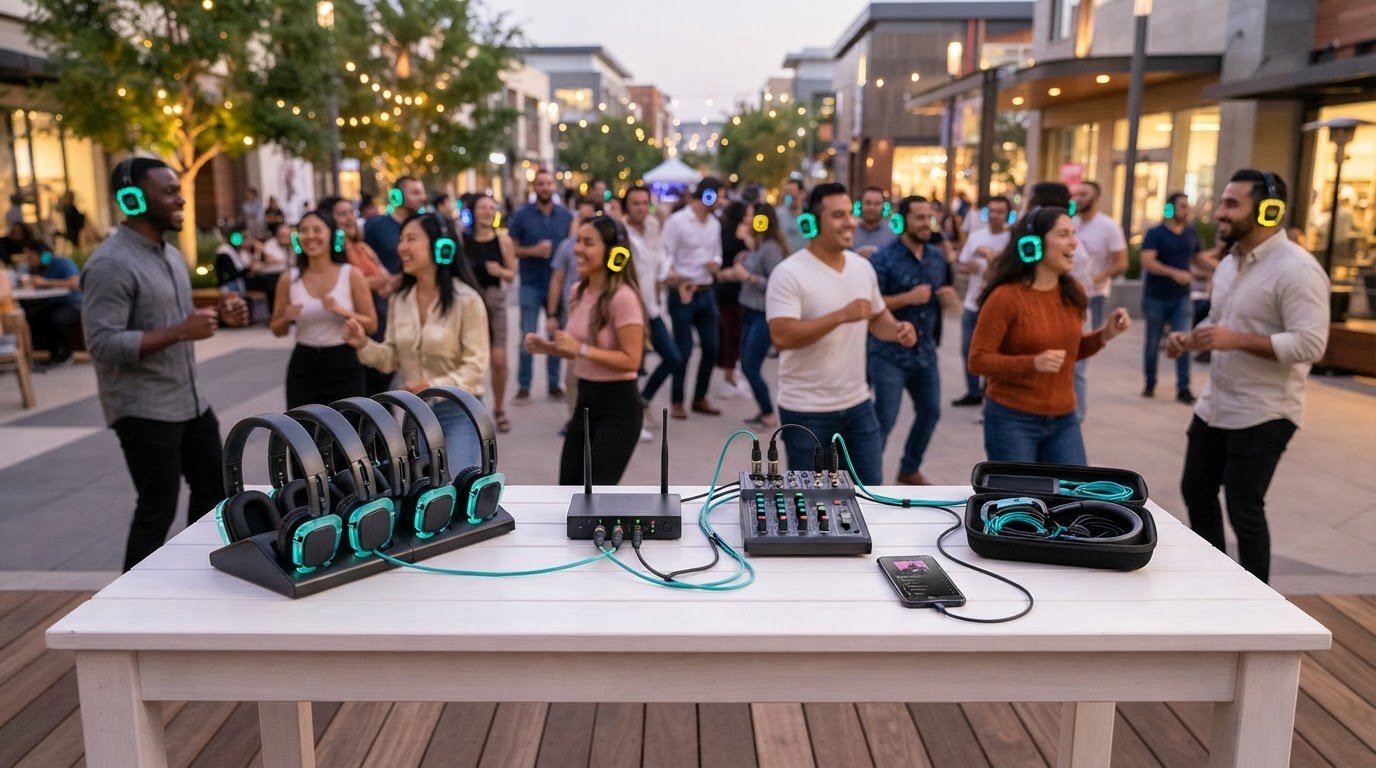
A silent disco is an event where guests listen to audio sent wirelessly to headphones instead of hearing it through a shared loudspeaker system. In a basic setup, an audio source feeds a transmitter, which sends a wireless signal to compatible headphones. For a broader overview of what a silent disco is, including its history and technology, see Wikipedia.
The chain is straightforward, but the equipment needs to fit the event format, audience size and audio plan. A DJ-led party may use different source equipment from a session that plays prepared audio. Start by identifying what needs to connect and what choices listeners should have, rather than counting headphones alone.
Which components form a basic silent disco setup?
Guests use the headphones to hear the event audio. A transmitter takes sound from an audio source and broadcasts it to compatible headphones. Depending on the setup and connections, the source could be DJ equipment or a playback device such as a phone, tablet or laptop.
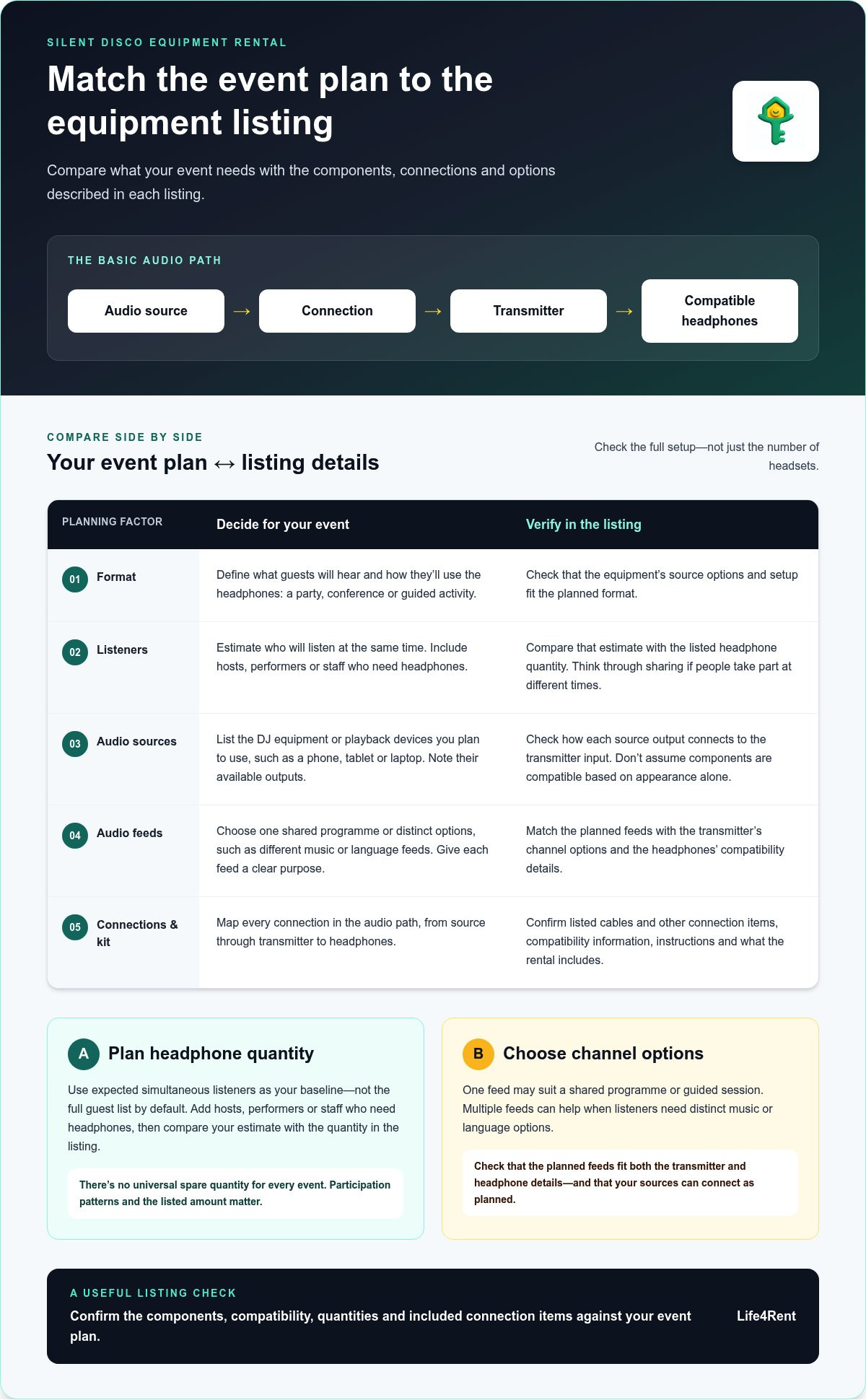
Before arranging silent disco equipment rental, map the signal path from beginning to end:
- Audio source: Identify where the music, speech or other audio will come from.
- Connection: Check how the source’s output will connect to the transmitter’s input.
- Transmitter: Confirm that it can send the planned audio feeds to the headphones.
- Headphones: Match their compatibility and channel options to the transmitter and event.
Compare that plan with the equipment details in each listing. Cables and other connection items can be as important as the main devices. Don’t assume two components will work together based on appearance or product type alone. Check the listed connections and compatibility information against the outputs and inputs you’ll actually use.
What do headphone channels and controls do?
Channels are separate audio feeds listeners can select on their headphones, if the system supports that setup. A DJ event might use different music on available channels, while a talk or fitness session could offer separate audio options. The number of feeds you plan to run should guide what you look for in both the transmitter and headphones.
Headphone controls may let each guest adjust the volume. Some equipment descriptions also mention features such as lights that indicate a selected channel, but features vary. Treat these as listing-specific details. First decide which controls and options guests need, then compare them with the equipment description.
Once the audio path and listener options are clear, you can judge a setup by how well it fits the event, rather than by headphone quantity alone.
How to match silent disco equipment to your event
Start with the event, not a rental package. A shared dance programme, a conference with separate sessions and a guided activity can have different listening needs. Estimate how many people will use headphones at the same time. That’s a more useful starting point than the total guest count alone.
Before comparing silent disco equipment rental options, write down your plan in this order:
- 1. Set the format: Decide what guests will hear and how they’ll use the headphones.
- 2. Estimate listeners: Count likely participants, plus hosts, performers or staff who need to listen.
- 3. Map audio sources: List the DJ equipment or playback devices you plan to use, including their available outputs.
- 4. Choose the feeds: Decide whether everyone will hear one programme or choose between distinct audio options.
- 5. Match the setup: Compare the required headphones, connections and channel options with the equipment details in each listing.
How many headphones should you plan for?
Use the number of expected listeners as your baseline, not the full guest list by default. At a party, most guests may want to listen at once. At a conference or activity, people may join and leave at different times. Add any hosts, performers or staff who need headphones to run or take part in the event.
There’s no universal spare quantity that suits every event. Think about how guests will participate, whether people will share headphones at different times, and what quantity the listing describes. If your estimate is close to the listed amount, plan who gets a headset and when so you can spot a mismatch before the event.
How many audio channels does your event need?
One audio feed may be enough when the audience shares a single programme, such as one DJ set or a guided listening session. Multiple feeds can help when guests need to choose between different music or language options. Give each feed a clear purpose so you don’t add complexity without improving the experience.
Make sure the planned channel count fits both the event and the equipment. Compare the number of distinct feeds you need with the transmitter and headphone details in the listing, and check that your audio sources can connect as planned. This is especially important for conferences or multilingual events where separate feeds need to run at the same time.
For a one-off event, temporary access can be a practical alternative to buying equipment you may rarely use. Life4Rent is a rental marketplace where people list and rent everyday items. Use the event plan to compare relevant listing details with your requirements.
Silent disco equipment rental vs buying: compare the practical trade-offs
The choice depends on how often you’ll use the equipment, where you’ll keep it and who will look after it. For a single event, temporary access may be simpler than storing a full setup afterward. For recurring events, ownership may be worth considering if you have a plan for regular use and upkeep.
| Factor | Renting | Buying |
|---|---|---|
| Event frequency | Can suit a one-off or occasional event. | May suit regular events that use the equipment repeatedly. |
| Storage | Avoids keeping equipment between events. | Requires a suitable place to store the full setup. |
| Upkeep | Responsibilities and terms depend on the rental listing. | You’re responsible for care, checks and keeping the equipment ready to use. |
| Access to equipment | Provides temporary access; package contents and terms vary by listing. | Gives you equipment to plan around for future events. |
When does renting make more sense than owning?
For a one-off celebration, work event or occasional community gathering, renting can provide temporary access without a permanent equipment purchase. That can suit organisers who don’t have room to store headphones and other components or don’t expect to use them again soon.
Peer-to-peer rental marketplaces connect people listing everyday items with people seeking temporary access. Life4Rent is a marketplace for listing and renting items across 17 categories. When comparing any listing, focus on the equipment it describes, the rental terms and whether its details match your event plan.
When might buying suit a regular event organiser?
Ownership may make sense if silent disco events are a regular part of your work and you have space to store the equipment. You’ll also be responsible for keeping it in usable condition and planning how it will be set up for each event.
Think beyond how often you’ll use the kit. Consider whether your events need the same setup each time, who will manage the equipment, and whether you can store it safely between uses. Buying isn’t automatically cheaper, and renting isn’t automatically easier. The better fit depends on your event schedule, storage and capacity to handle upkeep.
A practical checklist for comparing silent disco rental listings
Rental packages can look similar at a glance but differ in details that matter on event day. Compare each listing with your audio plan and venue setup, rather than assuming every kit includes the same components or connections. This is useful when arranging silent disco equipment rental through a peer-to-peer marketplace, where individual listings describe different items.
What should a rental listing explain about the equipment?
Look for clear quantities and descriptions. You should be able to match each item to a job in your setup, from the headphones guests will use to the connections and other components needed to run the system.
- Equipment and quantities: Check the number of headphones and the description of each other component.
- Connections: Compare the stated inputs or cables with the audio source you plan to use.
- Channels and operating details: Match the stated options and requirements to the feeds your event needs.
- Condition: Note any information about the equipment’s condition and what is included.
- Handover and return: Record the agreed collection or delivery arrangements, setup instructions and return details.
Don’t treat unclear terms as proof that a component will work with your setup. Compare the listed information with your event plan before making arrangements. A broader audio equipment rental guide can also help with general sound-equipment planning.
How can you reduce setup problems on event day?
Decide where the audio source and transmitter will sit before guests arrive. Plan the cable route and make sure the event lead can reach the controls without disrupting the room. Keep the transmitter and source close enough for the connections you’ve planned, and avoid leaving cables where guests will walk.
Leave time to test the complete audio path before the event begins. Play audio from the intended source, check that it reaches the headphones, and test every channel guests will use. If the system has several audio feeds, check each one individually. Keep setup instructions and handover details where the event lead can find them, not buried in someone else’s messages.
A simple comparison note helps when you’re weighing up several listings. Record what each one includes, how it connects to your source, the quantity available, and the handover and return arrangements. Explore rental listings on Life4Rent to compare listed items for temporary use.
Explore peer-to-peer equipment rentals with Life4Rent
A peer-to-peer marketplace connects people who list items with people who need temporary access to them. That gives event organisers another option to consider alongside buying, especially when equipment is needed for a particular occasion. Life4Rent connects renters and item owners through listings across everyday and professional categories.
How can renters use a marketplace for event equipment?
Write a short plan before browsing. List the components and quantities your event needs, the audio sources you’ll use, and any venue constraints that affect equipment placement. This makes it easier to compare listing details with your silent disco equipment rental requirements instead of relying on a headline or photo alone.
Use the list as a simple sequence:
- Define the setup: Note the required equipment, quantities, connections and number of audio feeds.
- Explore relevant listings: Look for listed items that appear to fit the event plan and venue.
- Compare the details: Check each listing’s description, contents, condition and practical instructions against your requirements.
- Plan the handover: Arrange rental and collection or delivery details through the process for the selected listing, then make sure the event lead has the relevant information.
Keep the venue plan close while comparing. For example, a source with a particular output or a transmitter that needs a specific position can affect whether a listed setup suits your event. Treat compatibility and operating details as specific to each listing, and use the item information to guide your choice.
How can equipment owners prepare a useful listing?
Clear listings help renters understand what they’re considering and plan around it. Describe each component accurately, state the quantities, and include clear, current photographs of the actual items being offered. Explain any connection requirements or operating instructions in plain language.
Include practical details about the equipment’s condition, handling and setup. Keep the written description, photos and included-item list consistent, and update them if the contents change. That gives potential renters a useful basis for comparing the listing with their event plan and helps set clear expectations for handover and return.
If you need temporary access for an event or have equipment to list, explore Life4Rent and use the listing details to plan your next step.
Plan your setup with confidence
A good silent disco setup starts with your event plan, not a one-size-fits-all package. Estimate how many people will listen at the same time, decide how many audio feeds you need, then match the headphones, transmitters, connections and handover details to those requirements.
For a one-off event, silent disco equipment rental can provide temporary access without adding equipment to store and maintain afterward. Compare each listing’s contents with your audio plan, and leave time to test the setup before guests arrive. If you organise events regularly, weigh that convenience against the storage and upkeep that come with owning equipment.
Life4Rent connects individual renters and item owners through a peer-to-peer marketplace covering 17 categories of everyday and professional items. Explore listings to compare items with your plans, or list equipment you’re ready to make available to others. Explore Life4Rent to plan your next step with a clear picture of the setup you need.
Frequently Asked Questions
What equipment do you need for a silent disco?
A basic silent disco setup needs an audio source, a compatible transmitter and wireless headphones for guests. The source might be DJ equipment or a playback device, depending on the event. Cables or other connection items may also be needed to link the source to the transmitter. Compare the listing’s component descriptions with your audio plan, since packages can differ.
How many headphones do I need for a silent disco?
Plan for the number of people likely to listen at the same time, not just the total guest count. Include hosts, performers or staff who will also need headphones. For example, a conference where only some attendees join a listening session may need fewer headsets than a party where most guests are expected to participate. Compare the quantity in each listing with your estimate.
How many channels should silent disco headphones have?
Choose channel capacity based on how many distinct audio feeds your event needs. One shared music programme may need only one feed, while separate music or language options call for more. The transmitter and headphones need to support the channel plan together. Decide what listeners should be able to choose, then compare that requirement with the equipment details in the listing.
Can I use my own DJ equipment with rented silent disco headphones?
It depends on whether your DJ equipment can connect to the transmitter in the setup. Compare the listed input or connection details with the outputs on your mixer or other audio source. Include any required cables in your setup plan, and test the full audio path before guests arrive. Don’t assume compatibility from the equipment type alone.
Is silent disco equipment difficult to set up?
A setup is easier to manage when you know how the audio source connects to the transmitter and how guests select headphone channels. Read the available instructions, place the source and transmitter where planned, and test audio through the headphones before the event. Leave time to resolve connection or channel-selection issues, and keep setup details accessible to the event lead.
Is renting silent disco equipment better than buying it?
It depends on how often you’ll use the equipment and whether you can store and maintain it. For an occasional event, silent disco equipment rental can provide temporary access without a permanent purchase. Regular organisers may prefer ownership if they have space and can manage care and setup. Compare the rental terms and package contents with the responsibilities of owning the equipment. Neither option is always the better fit.
Life4Rent
Rent it. Earn from it. Own less, access more.
Browse peer-to-peer rentals near you, or list what you own and start earning — all protected by Life4Rent Protect.
About the author
London, United Kingdom
Fred covers rental technology, app features, and platform mechanics for the Life4Rent Renting Academy. With a background in fintech journalism, he specialises in breaking down how digital rental platforms work — from payment protection and identity verification to smart pricing and booking management.