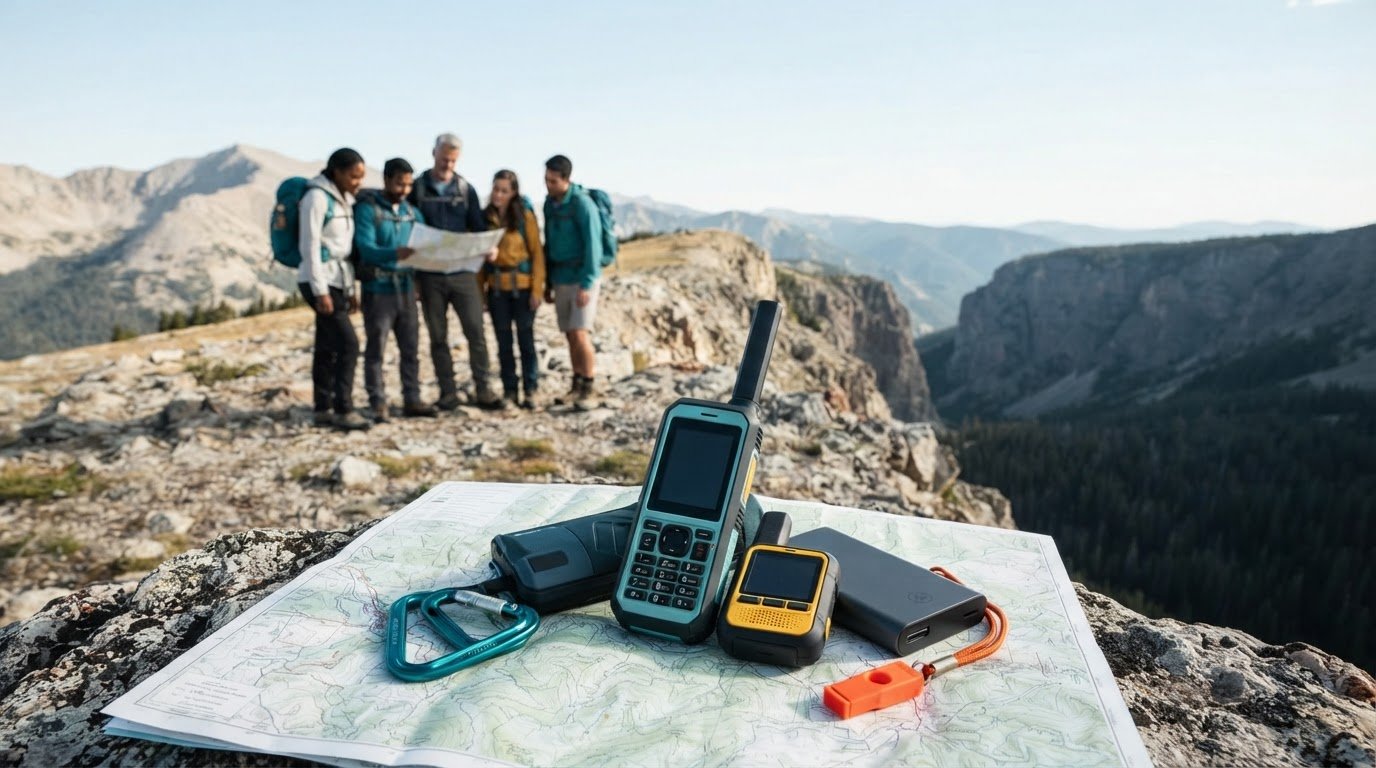
Rent a Satellite Phone for Hiking: A Practical 2026 Guide
October 14, 2026
Published by Life4Rent · Operated by Brohf Software OÜ
Before you rent a satellite phone for hiking, consider where your route goes and how your group needs to communicate. A phone suits voice calls, while a satellite messenger may be a better fit if brief messages or location updates are enough.
Coverage depends on the network and destination, not just the device label. Satellite signals also need a clear view of the sky, so deep canyons and dense forest can make a connection difficult. Those details matter when you compare rental options and decide what to carry.
A sound plan starts with your route, the communication you need, and a test of the device before you leave. Life4Rent is a peer-to-peer marketplace for exploring rentals across 17 categories. It’s EU-registered, includes Life4Rent Protect for safety, and secures payments through Stripe and PayPal. Use this guide to weigh coverage and device trade-offs, then prepare the phone and a simple check-in plan for your trip.
When does a hiking trip call for a satellite phone rental?
Will ordinary mobile communication meet your route’s needs? Start with the trail, not the device. A day hike near roads and populated areas may fit your existing communication plan, while a route through remote terrain can leave long stretches where mobile service is limited or unavailable. Check the route’s coverage information, but treat it as a planning aid, not a promise of reception.
Next, consider your itinerary and group. A solo hiker, a group splitting up, or a plan that may change can make reliable check-ins more important. Decide whether you need voice conversations for coordination or simply a way to signal that plans have changed. Satellite networks and devices work in different ways; How Satellite Phones Work offers a useful overview.
A short overview can help clarify what a satellite phone can and can’t do:
Which hiking situations make satellite communication worth considering?
A rental may be worth considering if your route spends substantial time away from towns, roads, or other places where you could seek help in person. It can also be relevant if you’re hiking alone, following a route with limited exit options, or coordinating a group whose members might become separated. These are reasons to assess communication needs, not guarantees that a satellite device will connect everywhere.
Separate routine check-ins from emergency communication. A check-in plan might set a time and a simple message for confirming progress, while an emergency plan should cover what the group will do if the device can’t connect or someone can’t use it. A phone is only one part of that plan. Share your route and expected return with someone who isn’t on the hike, and agree on what they should do if they don’t hear from you.
What should a satellite phone not replace?
A satellite phone doesn’t remove terrain, weather, battery, or user-related risks. It needs suitable conditions to connect, and a device with a depleted battery, blocked view of the sky, or unfamiliar controls may not serve its intended purpose. Before setting out, learn its basic operation and include charging and power management in your preparations.
Keep communication separate from navigation and route preparation. Carry the navigation tools you know how to use, check the route and conditions, and have a plan for turning back or changing course. Satellite communication is a backup for contacting others, not a safety guarantee.
In short: Renting makes more sense when the route is remote and your communication plan needs a voice link, especially for solo travel or a group with changing plans. For a familiar, accessible route with a suitable check-in plan, a satellite phone may add little. The right choice depends on the route, the group, and what you’ll do if communication fails.
How satellite phones work on hiking routes, and where coverage needs checking
A satellite phone sends and receives calls through satellites rather than nearby mobile towers. That can make communication possible beyond ordinary mobile coverage, but the network built into the device still matters. A phone’s advertised reach doesn’t tell you whether it will connect at every point on your route.
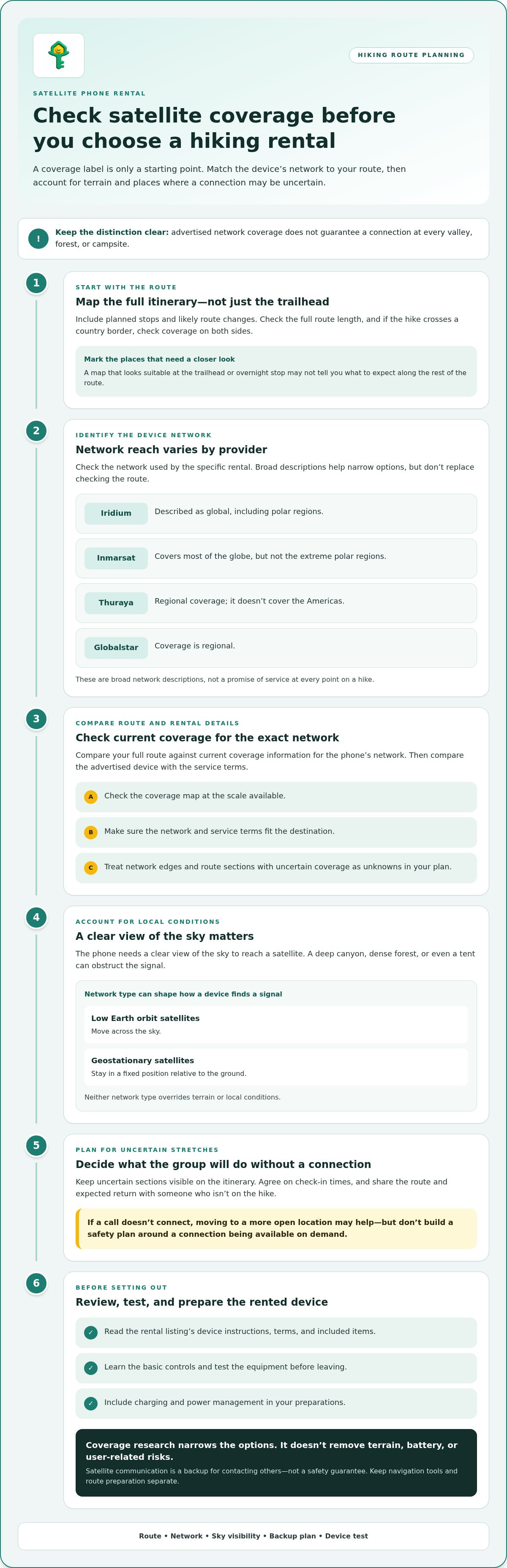
Coverage differs by network. Iridium’s network is described as global, including polar regions; Inmarsat covers most of the globe but not the extreme polar regions; Thuraya is regional and doesn’t cover the Americas. Globalstar coverage is also regional. These broad descriptions are a starting point, not a substitute for checking the network used by the specific rental.
How can hikers assess coverage before choosing a rental?
Match the exact route, including planned stops and likely changes, against current coverage information for the phone’s network. Then compare the advertised device with the service terms. The network and terms need to fit the destination, not just the device category. If a route crosses network boundaries or approaches a coverage edge, mark those stretches as uncertain and plan how the group will manage without a connection.
Check the map at the scale available and look closely at the route’s full length, not only its trailhead or overnight stop. If your itinerary crosses a country border, check coverage on both sides. A broad label such as “global coverage” describes network reach, not a live connection from every valley, forest, or campsite.
What affects a satellite phone connection outdoors?
The phone needs a clear view of the sky to reach a satellite. A deep canyon, dense forest, or even a tent can obstruct the signal, so a mapped coverage area doesn’t remove local obstacles. The type of network also affects the experience: low Earth orbit satellites move across the sky, while geostationary satellites stay in a fixed position relative to the ground. This can shape how a device finds a signal, but neither network type overrides terrain or local conditions.
Advertised coverage shows where a network may be available, not that a satellite phone will connect at every point. Terrain, sky visibility, device capability, and current conditions all matter. If a call doesn’t connect from one spot, moving to a more open location may help, but don’t build a safety plan around a connection being available on demand.
Before you rent a satellite phone for hiking, use the coverage check to narrow down suitable network options, then keep uncertain sections visible on your itinerary. Pair that research with a communication backup, such as agreed check-in times and a contact who has your route details. If you’re comparing outdoor rental options, browse Life4Rent listings alongside your route and device requirements.
Satellite phone, messenger, or beacon: compare options for your hike
Choose by communication task, not by which device sounds most capable. Do you need to speak with someone, send short updates, or have a way to transmit an emergency signal? Those needs overlap only partly, so start with the role the device must play and how often you expect to use it.
| Device type | Typical communication | May suit |
|---|---|---|
| Satellite phone | Two-way voice calls, depending on the device and service | Hikers who need direct conversations for coordination or updates |
| Satellite messenger | Message-based communication; features vary by device and service | Hikers whose plan relies mainly on short messages |
| Personal locator beacon | One-way emergency SOS signaling; no two-way messaging | Hikers seeking an emergency signaling device rather than routine contact |
When might a satellite phone suit the communication task?
A satellite phone is worth considering when direct voice conversation is central to your plan. For example, a group with changing arrangements may prefer to talk through a decision rather than exchange short updates. If you mainly want to confirm progress at set times, voice calls may be more than you need. Compare the device and service terms carefully, since rentals don’t necessarily include the same accessories or features.
How do satellite messengers and personal locator beacons differ?
A satellite messenger is built around message-based contact, while a personal locator beacon is designed to send an emergency distress signal. A beacon isn’t a substitute for regular check-ins or back-and-forth coordination. Likewise, a messaging device’s emergency functions can differ by model, so don’t assume all devices work alike. Emergency signaling and ongoing group communication are separate needs.
Think through the trip’s communication pattern before choosing. A solo hiker who wants routine status messages may value messaging more than voice; a group coordinating separate plans may have a stronger case for calls. If your main requirement is an emergency signal, compare that need with the beacon category rather than assuming a phone or messenger covers it in the same way. In every case, check the exact device, network coverage, service terms, and operating instructions for the rental.
Decision rule: Choose a satellite phone for a plan that depends on two-way voice, a messenger for message-based contact, or a beacon for emergency signaling only. Then check that the category suits your route and backup plan. No device removes the need to prepare for a failed connection or to carry the navigation tools your hike requires.
If you’re comparing rental options, you can browse peer-to-peer rental listings on Life4Rent, including items in outdoor and electronics categories. Compare listing details with the communication role you’ve settled on, rather than assuming every device will meet the same needs.
Prepare a rented satellite phone before the hike
A rental only helps if it fits the route and you know how to use it before you leave. If you plan to rent a satellite phone for hiking, treat preparation as part of the trip plan, not a last-minute equipment check. Read the listing and the owner’s instructions, then make time to test the device before the trailhead.
- Match the listing to your itinerary. Check that the listing describes the device you need and covers your planned rental dates. Compare those dates with your full itinerary, including any travel days when you’ll need the phone.
- Read the rental details. Review the specific terms, instructions, included items, and any contact or return arrangements provided in the listing. Don’t assume that two rentals of similar devices include the same accessories or service.
- Clarify how to operate it. Use the platform’s rental process to resolve questions about the listed device or its instructions before the trip. Make sure you understand its controls and the steps described by the owner.
- Test it before departure. Follow the device instructions to check that it powers on and that you can carry out the basic operation you expect to use. Practice before you’re out on the route, and note anything that remains unclear.
- Plan power and contacts. Check the device’s power needs in its instructions and plan how you’ll keep it ready throughout the hike. Store relevant contact details and agree with your group on when and how you’ll communicate.
What should hikers check when arranging the rental?
Read the listing closely rather than relying on a general description of the device category. Check the rental dates against your itinerary, note what the owner says is included, and keep the provided operating instructions accessible. Record any contact and return arrangements stated for that rental. If an operating detail is unclear, raise it through the platform’s rental process before setting out.
What belongs in the communication plan?
Share the route and expected check-in times with everyone in the hiking group, and make sure each person knows the plan if the itinerary changes. Choose a contact outside the group who has the route details, and agree on what that person should do if a planned check-in is missed. A missed message doesn’t guarantee that someone will know your location or be able to respond, so include steps the group can take if the phone can’t connect.
Checklist: confirm the route, save the contacts, test the device, plan for power, and agree on a backup plan. Keep the plan simple enough to remember when conditions change, and don’t rely on the phone as your only way to manage a problem.
Once you know what device and dates your route requires, explore peer-to-peer rental listings on Life4Rent and compare each listing’s details and terms with your preparation checklist.
Find a peer-to-peer rental through Life4Rent
Life4Rent connects renters with individual owners and businesses listing items across 17 categories, including electronics and outdoor and sports equipment. Explore listings and assess each one against the communication needs and route plan you’ve already worked out.
How can hikers assess a marketplace listing?
Start with the device and rental period described in the listing. Check that the dates match your itinerary, then compare the owner-provided terms and item details with your intended use. For a satellite device, the network and service information matter as much as the device category. Don’t assume that similar devices come with the same coverage, instructions, or rental terms.
Available user reviews and verification details can offer context about the person listing an item, but they don’t guarantee its condition or make a rental risk-free. Read the listing carefully, keep the agreed details in the platform, and use its rental process for any questions about the item or terms. Before committing, make sure the information you need to prepare for the hike is clear.
What does Life4Rent provide to renters and owners?
The platform supports listing, renting, selling, and rent-to-own across its categories. Renters can compare details from individual owners and businesses, while owners can make items available to people who need them temporarily. For a hiking trip, focus on whether the individual listing fits your dates, route, and planned use rather than assuming that every device in a category offers the same features.
For eligible items, owners have a 0% listing fee and 0% commission, and keep 100% of the rental price. Those platform terms don’t set the price or rental conditions of a particular item, so renters should use the specific listing for those details. Owners can also review the platform terms that apply to their own listings.
Life4Rent is EU-registered and includes Life4Rent Protect for safety. Payments are secured through Stripe and PayPal within the platform. Those features support transactions on the marketplace, while the specific item details and rental terms remain important to review before choosing.
Make your communication plan part of the route
Before you commit to a rental, write down what you need communication to do on this specific trip. A clear requirement makes it easier to decide whether to rent a satellite phone for hiking or choose another type of device, and gives you a practical way to compare individual listings without getting distracted by labels.
Then leave room for the realities of the trail. Your plans may change, a device may not connect where you expect, and a backup plan still matters. Set expectations with your group and your off-trail contact before departure, so everyone knows what a check-in means and what to do if it doesn’t happen.
Compare each listing against your route and communication needs, and choose only when the details make sense for your plan. A little preparation now can help you set out with a clearer, more considered approach.
Frequently Asked Questions
Do I need a satellite phone for hiking?
Not necessarily. It may be useful if your route is remote, your plans depend on voice calls, or your group needs a way to coordinate beyond mobile service. For a well-traveled day route with other communication arrangements, a phone rental may add little. Before deciding, consider what you’d do if a check-in is missed and whether a satellite phone would change that plan.
Can a satellite phone work where mobile phone coverage is unavailable?
Yes, it can communicate through a satellite network rather than relying on nearby mobile towers, provided the device and service support the area. That doesn’t mean it will connect at every location: terrain, obstructions, and the network’s coverage can affect access. Check the network information for your destination and keep another plan for places where a call or message can’t get through.
How do I choose a satellite phone rental for a hiking trip?
Choose a rental by matching its network and communication type to your route and intended use. For example, a trip that crosses remote terrain may need different coverage planning from a hike near populated areas. Compare the device and service terms, the rental dates, and what the listing says is included. Leave time to learn the controls and confirm the device works before you set out.
How much does it cost to rent a satellite phone for hiking?
There isn’t one standard rental price. Review the price and rental terms stated in each listing, including what the listing says is included. Compare the full details with your itinerary and intended use before choosing.
What happens if a satellite phone cannot connect on the trail?
You may need to wait or try again from a location with a clearer view of the sky, but a connection still isn’t guaranteed. Don’t let repeated attempts replace your contingency plan. Follow the steps agreed with your group, use another communication option if available, and make decisions based on the conditions and route. A phone can’t ensure that an outside contact receives or responds to a call.
Can I use a satellite phone inside a tent or building?
Often, an enclosed or obstructed location can prevent a satellite phone from reaching the network. A tent, roof, or surrounding walls may block the device’s view of the sky. If you need to place a call, follow the device instructions and, when conditions allow, move to a safe, open spot. Don’t assume that being inside a tent or building will provide a usable connection.
Should I rent a satellite phone or use a satellite messenger?
Choose based on whether you need voice calls or mainly want to send messages. A satellite phone may suit a group that needs direct conversations, while a messenger may fit a plan built around short status updates. For example, hikers who only need to confirm they’ve reached a planned stop may not need voice communication. Compare the specific device’s functions and service terms before choosing.
Related guides on Life4Rent
Ready to rent instead of buy? See all outdoor gear available to rent on Life4Rent →
Life4Rent
Rent it. Earn from it. Own less, access more.
Browse peer-to-peer rentals near you, or list what you own and start earning — all protected by Life4Rent Protect.
About the author
Tallinn, Estonia
Philip leads editorial at the Life4Rent Renting Academy, overseeing guides on peer-to-peer rental, platform safety, and consumer finance across 25 markets. He has spent over a decade covering the sharing economy and digital marketplaces, helping renters and owners navigate the shift from ownership to access.