远程工作短期笔记本电脑租赁:实用指南 (2026)
May 23, 2026
发布方 Life4Rent · 运营方 Brohf Software OÜ
It's understandable if you feel uneasy about using a device that isn't yours. You might worry about whether the specs can handle your specific software or if your browser history stays on the hard drive after you hand it back. These are valid concerns that every professional freelancer or remote employee faces when hardware fails or projects scale up.
This guide shows you how to find high-quality hardware for temporary projects without the high cost of ownership. We'll cover how to check for essential 2026 specs like 16GB of RAM and Windows 11 Pro. You'll also find out how peer-to-peer platforms like Life4Rent handle security protocols and fair pricing so you can work with total confidence.
The logic behind short-term laptop rentals for remote work
A short term laptop rental for remote work is a straightforward agreement where you pay to use a device for a set time. You'll usually find terms ranging from one week to three months, which is the sweet spot for most freelance contracts or repair cycles. This setup is a key component of the sharing economy, which focuses on the benefits of access rather than the weight of ownership. It's a practical way to stay productive without the immediate financial hit of a brand-new purchase.
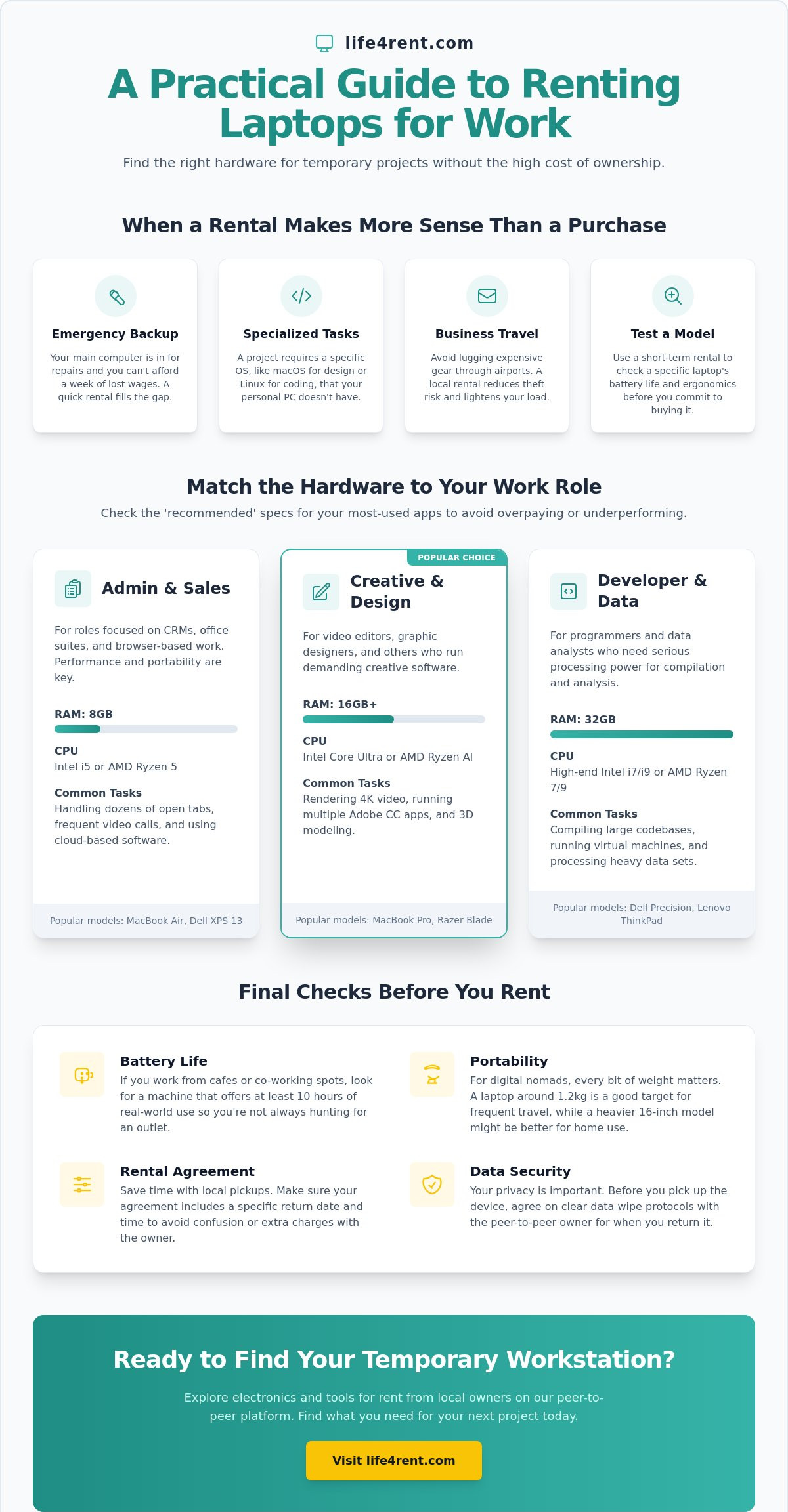
Remote professionals often turn to this option when their primary computer is in the shop for repairs. A week without a laptop can mean a week of lost wages, so a quick rental fills that gap perfectly. Sometimes a temporary project requires a specific operating system, such as needing a Linux environment for a coding task or macOS for a design job, that you don't have on your personal PC. A rental allows you to meet these client requirements without a permanent hardware change.
To see how a flexible setup supports a mobile lifestyle, watch this video on portable workstations:
When a rental makes more sense than a purchase
Specific projects might require high-end processing power that you only need for a few months. If you're handling a heavy data analysis task, you can rent a machine with 32GB of RAM and return it when the work is done. Travelers often find that a local rental is a safer choice than lugging expensive personal gear through airports and trains. It reduces the risk of theft and ensures you have a functional device waiting for you at your destination. You can also use a short-term rental to test a specific model's ergonomics and battery life before you commit to a major purchase.
Financial trade-offs of the rental model
Upfront costs for a rental are much lower than the full retail price of a new machine. You'll save money by avoiding the steep depreciation that happens the moment a new laptop is unboxed. Owners typically handle the hardware maintenance and ensure the software is updated before you get the device, which saves you time and technical headaches. You won't have to deal with the long-term burden of a financing plan or high-interest credit card debt. This flexibility keeps your overhead low and your cash flow healthy during quieter work months.
If your business growth eventually requires a permanent hardware investment that exceeds your current budget, comparing loan options through FINLAT | 25+ kredītiestādēs un bankās can help you find the most sustainable financing terms across dozens of institutions.
Hardware requirements for different remote work roles
The hardware you choose dictates how smoothly your workday goes. A short term laptop rental for remote work should be a tool that matches your specific tasks rather than a generic device that struggles under your software load. You don't need a high-end workstation for data entry, but you'll certainly regret a budget model if you're compiling code or rendering 4K video. It's best to check the "recommended" specs for your most-used apps before you sign a rental agreement.
In 2026, many remote roles benefit from AI-ready processors like the Intel Core Ultra or AMD Ryzen AI. These chips handle background tasks like noise cancellation and camera blur during video calls more efficiently. This technology preserves your battery for actual work tasks and keeps the system running cool. You can find many of these modern electronics for rent from local owners who keep their gear updated with the latest tech.
Specifications for administrative and sales roles
Hardware for developers and creative professionals
Professional workflows demand more robust internal components to handle heavy processing. Software development in 2026 usually requires at least 16GB of RAM to run virtual machines and complex code editors without stuttering. Graphic designers and photographers must prioritize high-resolution screens with accurate colour profiles to ensure their work looks correct across different devices. If your project involves 3D rendering or heavy video editing, a dedicated graphics card is a non-negotiable requirement to prevent system crashes and long export times.
Security measures for peer-to-peer laptop rentals
Data privacy is the most significant concern when you opt for a short term laptop rental for remote work. You don't want to find the previous user's tax returns, and you certainly don't want the next person seeing your client's confidential files. Both parties must agree on a strict factory reset protocol before the device changes hands. While a guest account offers a quick fix for a single afternoon, it's not a full solution for a multi-week project where you'll be logging into multiple professional platforms.
A factory reset ensures that every bit of local data is wiped before the laptop moves to the next person. You can verify this by checking the initial setup screen when you first power on the machine. If the laptop boots directly to a desktop with an existing user profile, it's a sign that the privacy steps weren't completed. You should insist on a reset in these cases to protect your professional reputation and your client's data.
Encrypted drives provide an extra layer of protection that's standard on most professional machines in 2026. You should check if BitLocker or FileVault is active to keep your work files secure even if the hardware is lost or stolen. Physical inspections are just as important as digital ones. You'll want to document any scratches or screen issues during the handoff to avoid paying for pre-existing damage when the rental ends. A five minute walk-around with the owner can save you from a stressful dispute later.
The renter’s security checklist
A clean install of the operating system is the first step toward a safe working environment. You can usually perform this through the system recovery settings, which ensures no hidden scripts remain from the previous user. It's a smart habit to run a quick scan for keyloggers or tracking software if the owner hasn't performed a fresh install. You should always use a VPN when you work on a rented device to encrypt your traffic and mask your activity from any local network monitoring tools. These steps are especially important if you're using the high-performance models mentioned earlier, as their processors often have built-in security modules that you should verify are active.
How owners protect their hardware
The removal of all personal accounts is mandatory before any rental starts. You shouldn't leave your iCloud or Google account active, as this gives the renter access to your personal data and synced passwords. Item protection plans on platforms like Life4Rent offer financial security if the hardware is damaged or lost during the term. Owners keep their interests safe by taking clear photos of the device's condition on the day of the exchange. These images act as evidence to prevent disputes at the end of the rental period.
Logistics and rental agreements for short-term use
Local pickups are often much faster than waiting for a courier service to deliver a device. If your primary machine fails on a Tuesday morning, you can typically find a neighbor with a spare laptop and be back online by the afternoon. This speed is a major advantage of the peer-to-peer model over corporate rental firms that might take 48 hours or more for shipping. You'll also save on delivery fees, which can be a significant part of the total cost for a one-week short term laptop rental for remote work.
Rental agreements must state the exact return date and time to avoid any confusion at the end of the term. Late fees are a standard part of the peer-to-peer rental experience, and they're usually calculated on a daily basis. You should make sure the condition of the battery is noted in the agreement before you leave. A battery that only holds a charge for two hours isn't much use for a digital nomad, so checking the health report in the system settings is a smart move before you finalize the deal.
Software licenses are typically not included in a basic hardware rental. You'll usually get a clean install of Windows 11 or macOS, but apps like Microsoft 365 or Adobe Creative Cloud are your responsibility. Most professionals already have their own subscriptions, so you just need to log in with your credentials. Just remember to log out and remove your account before returning the device to ensure your data stays private. This practice protects your professional accounts and prevents the next renter from accessing your work history.
Understanding the rental contract
The contract should define what happens if the hardware fails through no fault of your own. If the motherboard dies during normal use, you shouldn't be held liable for the replacement cost. Liability for accidental damage, like a coffee spill or a cracked screen, must be clear from the start. You'll also want to know if the owner offers any technical support during the term. Most peer-to-peer owners aren't IT experts, so you'll likely be responsible for your own troubleshooting if the software acts up.
Pickup and return protocols
The meeting for the hand-over is the best time to test the charger and all the ports. You don't want to get home and realize the USB-C port is loose or the power brick doesn't work. A functional test of the keyboard and screen takes only two minutes but prevents a lot of headaches later. Returns should include a signed confirmation or a digital handshake on the platform to prove the device is back in the owner's hands. If you're ready to find a device near you, check out the available electronics for rent on Life4Rent today.
Finding your next work device on Life4Rent
Life4Rent connects you with local owners in your community, making it easy to find a short term laptop rental for remote work without the corporate overhead. You'll find a variety of categories ranging from electronics and tools to baby gear and outdoor sports equipment across 17 different sections. This marketplace approach allows you to bypass the mountain of paperwork usually required by big rental firms. Reviews from previous renters provide a transparent look at an owner's reliability before you commit any money.
The booking process is designed to be as simple as a direct message. You can see the actual photos of the device and ask the owner specific questions about the hardware. This level of direct communication is rare in traditional rental markets where you often get a "similar model" instead of the exact one you saw online. It's a practical way to support the sharing economy in Estonia while getting exactly what you need for your project. You'll find that most owners are happy to help a fellow professional get back to work quickly.
Trust is built into the platform through verified profiles and secure payment systems. You don't have to worry about the risks of meeting strangers from unmoderated classified sites. The system keeps your transaction safe until the device is in your hands. This structure makes it much easier for freelancers to scale their hardware needs up or down as their client list changes throughout the year.
The benefits of a local P2P marketplace
Peer to peer equipment rental reduces the need for constant new production of high-tech gear. You can often find a tool on rent for your home office setup, such as a high-quality monitor arm or an ergonomic chair, alongside your laptop. Local rentals mean you don't have to pay for expensive shipping or wait days for a courier to arrive. Most exchanges happen within a few kilometers of your home or office, which keeps the logistics simple and fast. This local focus also means you can inspect the item in person before the rental period officially begins.
In addition to ergonomic furniture, the right lighting is a key part of any professional setup; you can explore Decor to find Ergovanta’s range of lamps and fixtures that help create an ideal working environment.
How to start your first rental
A search for "laptop" in your city is the best starting point to see what's available nearby. You should message the owner to confirm the specs and the operating system version before you pay for the booking. This neiybor approach to sharing makes the process feel more personal and grounded than dealing with a faceless call center. Once you've verified the details, you can set a meeting time that works for both schedules. This flexibility is exactly what remote workers need when they're facing a hardware emergency or a tight project deadline.
Practical steps for your next project
You now have a clear path to choosing the right hardware for your temporary needs. It's best to prioritize specific specs like 16GB of RAM for heavy tasks and to always insist on a factory reset protocol to keep your data safe. A short term laptop rental for remote work doesn't have to be a gamble if you use a secure marketplace and check the condition of the device during the hand-over.
Life4Rent offers a secure peer-to-peer marketplace with local listings in Estonia and beyond. You can browse through 17 categories of daily rental items to find exactly what your home office is missing. This local approach saves you from the high costs of ownership and the delays of traditional shipping. Find a laptop for your next project on Life4Rent and get back to your work with a reliable machine.
Frequently Asked Questions
How much does it cost to rent a laptop for a week?
Rental prices vary based on the specific model and the owner's listing. You'll often find mid-range laptops for roughly $140 per week, while budget options might start at $39 for basic tasks. High-performance machines with AI-ready processors or dedicated graphics cards naturally cost more. It's helpful to compare local listings to find the best balance between performance and price.
Is it safe to put my personal files on a rented laptop?
Personal data is safe if you follow a strict cleanup routine before the return. You should use encrypted cloud drives instead of saving work directly to the local hard drive. Every user should log out of all accounts and perform a full factory reset. This practice protects your professional reputation and keeps your history away from the next person.
What happens if I accidentally damage the rented device?
You're generally responsible for the cost of repairs or replacement if you cause accidental damage. You should check the platform's protection plans and the specific terms in your rental agreement first. Clear photos taken at the start of the term help you avoid disputes over pre-existing scratches. Most peer-to-peer agreements require you to report any issues to the owner immediately.
Can I install my own software on the rented machine?
You can usually install the software you need for your project. Most owners provide a clean operating system, so you just log in with your own licenses for professional tools. You must uninstall everything and wipe your data before the short term laptop rental for remote work ends. This ensures the machine is ready for the next person and your accounts remain secure.
Does the laptop come with a charger and a bag?
A charger is always included with the device, but a bag depends on the specific listing. You should check the item description or message the owner to confirm these accessories. You'll want to test the charger at the hand-over to ensure it works correctly. If you need extra gear like a mouse or a headset, you can often find these in the electronics category.
What is the best way to wipe my data before returning the laptop?
A full factory reset through the system settings is the most effective method for both Windows and macOS devices. This process erases your files, accounts, and settings to return the system to its original state. You should also sign out of your browser sync and clear the Trusted Platform Module (TPM). This step takes about 20 minutes but provides total peace of mind.
Are there any specific requirements for renting through Life4Rent?
You need a verified profile on the platform to start booking items from local owners. This involves a quick identity check to ensure the marketplace stays safe for the community. You can browse 17 categories of daily rental items and message owners directly once your account is active. The process is straightforward and focuses on building trust between neighbors who share their resources.
Can I extend my rental period if my project takes longer than expected?
You can often extend your rental if the owner doesn't have another booking lined up. You should request an extension through the platform at least 48 hours before the original return date. This gives the owner time to adjust their schedule and keeps your short term laptop rental for remote work fully covered. Most owners are flexible if you communicate your needs early and clearly.
Related guides on Life4Rent
Ready to rent instead of buy? See all electronics available to rent on Life4Rent →
Life4Rent
Rent it. Earn from it. Own less, access more.
Browse peer-to-peer rentals near you, or list what you own and start earning — all protected by Life4Rent Protect.
About the author
Tallinn, Estonia
Philip leads editorial at the Life4Rent Renting Academy, overseeing guides on peer-to-peer rental, platform safety, and consumer finance across 25 markets. He has spent over a decade covering the sharing economy and digital marketplaces, helping renters and owners navigate the shift from ownership to access.